← Zurück zur A7Info-SeiteBack to A7Info page
1. Einleitung1. Introduction
A7Info ist ein Programm zur Anzeige der in den RAW- und JPG-Dateien von Sony E-Mount Kameras enthaltenen Metadaten. Ziel ist es, dem Kamerabenutzer einen schnellen und umfassenden Blick auf die EXIF- und MakerNotes-Informationen der Bilddateien zu ermöglichen. A7Info is a program for displaying the metadata contained in the RAW and JPG files of Sony E-Mount cameras. The goal is to give the camera user quick and comprehensive access to the EXIF and MakerNotes information in image files.
ProgrammfunktionenFeatures
- Anzeige von EXIF- und MakerNotes-Daten (Belichtung, AF-Einstellungen, Objektivdaten, Auslösezahl u. v. m.)Display of EXIF and MakerNotes data (exposure, AF settings, lens data, shutter count and more)
- Anzeige der Autofokus-Positionen im Bild (FocusLocation, PhaseAF, TrackingAF, EyeAF)Display of autofocus positions in the image (FocusLocation, PhaseAF, TrackingAF, EyeAF)
- Kameraeinstellungen als Overlay ähnlich dem Kameradisplay (OnScreen Infos)Camera settings as overlay similar to the camera display (OnScreen Infos)
- Anzeige des eingebetteten Vorschaubildes (RAW) oder des vollständigen JPGDisplay of the embedded preview image (RAW) or the complete JPG
- Anzeige des vollständigen Raw-Bilds über LibRaw-BibliothekDisplay of the full raw image via LibRaw library
- RGB-Histogramm des VorschaubildesRGB histogram of the preview image
- Statistische Auswertungen: Blende, ISO, Belichtungszeit, Brennweite, MessmethodeStatistical analyses: aperture, ISO, exposure time, focal length, metering method
- Ausdruck der Aufnahmeinformationen als SteckbriefPrint of capture information as a data sheet
- Öffnen von Dateien in externen ProgrammenOpen files in external programs
- Crop Resolution Calculator: Berechnung des Auflösungsverlustes beim BeschneidenCrop Resolution Calculator: calculate resolution loss when cropping
- J/K-Tastaturnavigation im DateibrowserJ/K keyboard navigation in the file browser
- Echtzeit-Suchfeld zur Filterung der EXIF-/MakerNotes-DatenReal-time search field for filtering EXIF/MakerNotes data
- Sternebewertung 0–5 pro Bild (lokal gespeichert, Lightroom-Export möglich)Per-image star rating 0–5 (stored locally, Lightroom export available)
- Batch-EXIF-Export als CSV oder JSONBatch EXIF export as CSV or JSON
- FullSizeRaw: 4-Kanal-RAW-Histogramm (R/G1/G2/B) mit EV-Skala direkt aus den Bayer-SensordatenFullSizeRaw: 4-channel RAW histogram (R/G1/G2/B) with EV scale directly from Bayer sensor data
- FullSizeRaw: lineares Vorschaubild ohne Gamma-KorrekturFullSizeRaw: linear preview image without gamma correction
- FullSizeRaw: asynchrones Laden (UI blockiert nicht)FullSizeRaw: asynchronous loading (UI does not block)
- FullSizeRaw: RAW-Technologie-Panel (ARW-Version, Kompression, Bittiefe, Sensordimensionen)FullSizeRaw: RAW technology panel (ARW version, compression, bit depth, sensor dimensions)
SystemanforderungenSystem Requirements
| PlattformPlatform | AnforderungRequirement |
|---|---|
| Windows | Windows 10 oder neuer, 64-BitWindows 10 or later, 64-bit |
| macOS | macOS 15 (Sequoia) oder neuer; Universal Binary für Intel und Apple SiliconmacOS 15 (Sequoia) or later; Universal Binary for Intel and Apple Silicon |
Unterstützte KamerasSupported Cameras
Stand Version 4.2.0 (Juni 2026). Aufgrund der verschiedenen Eigenschaften der Kameras können Unterschiede in den angezeigten Daten auftreten.As of version 4.2.0 (June 2026). Due to the different characteristics of the cameras, differences in the displayed data may occur.
| SerieSeries | ModelleModels |
|---|---|
| A7 VollformatFull-frame | A7 II, A7 III, A7 IV, A7 V, A7C, A7C II, A7CR |
| A7R | A7R II, A7R III, A7R IV, A7R V, A7R VI |
| A7S | A7S II, A7S III |
| A9 | A9, A9 II, A9 III |
| A1 | A1, A1 Mark II |
| APS-C | A6100, A6400, A6600, A6700 |
2. Download und Installation2. Download and Installation
Die aktuelle Version kann auf der Downloads-Seite heruntergeladen werden.The current version can be downloaded from the Downloads page.
| PlattformPlatform | DateiFile | HinweisNote |
|---|---|---|
| Windows | A7InfoSetup.exe | Setup-Installer: Doppelklick, dann dem Setup-Assistenten folgenSetup installer: double-click and follow the setup wizard |
| macOS | A7InfoSetup.dmg | DMG öffnen (Doppelklick), A7Info.app in den Ordner Programme (Applications) ziehenOpen the DMG (double-click), drag A7Info.app into the Applications folder |
Unter Windows wird die Microsoft Visual C++ Laufzeitbibliothek benötigt und ggf. automatisch mitinstalliert.On Windows, the Microsoft Visual C++ runtime library is required and will be installed automatically if needed.
macOS: Erster ProgrammstartmacOS: First Launch
Da A7Info außerhalb des Mac App Store vertrieben wird, zeigt macOS beim allerersten Öffnen eine Sicherheitswarnung. Der folgende Ablauf ist einmalig erforderlich:Because A7Info is distributed outside the Mac App Store, macOS displays a security warning the very first time it is opened. The following steps are required once:
- Doppelklick auf A7Info im Ordner Programme (Applications). macOS blockiert den Start mit dem Hinweis „A7Info kann nicht geöffnet werden".Double-click A7Info in the Applications folder. macOS blocks the launch with the message "A7Info cannot be opened".
- Systemeinstellungen öffnen → Datenschutz & Sicherheit wählen.Open System Settings and select Privacy & Security.
- Im Abschnitt Sicherheit (nach unten scrollen) erscheint der Hinweis, dass A7Info blockiert wurde. Auf Dennoch öffnen klicken.In the Security section (scroll down), a note about A7Info being blocked will appear. Click Open Anyway.
- Den folgenden Dialog mit Öffnen bestätigen. Ab jetzt startet A7Info ohne weitere Warnung.Confirm the subsequent dialog by clicking Open. From now on, A7Info will launch without further warnings.
macOS: Zugriff auf Fotoordner erlaubenmacOS: Granting Access to Photo Folders
macOS schützt Ordner wie Schreibtisch, Dokumente und Downloads durch individuelle Zugriffsrechte. Beim ersten Zugriff auf einen dieser Ordner fragt das System nach Erlaubnis. Erscheint dieser Dialog wiederholt oder zeigt A7Info keine Dateien an, müssen die Berechtigungen manuell eingerichtet werden:macOS protects folders such as Desktop, Documents, and Downloads with individual access permissions. The first time one of these folders is accessed, the system asks for permission. If this dialog keeps reappearing or A7Info does not show any files, permissions must be set manually:
- Systemeinstellungen → Datenschutz & Sicherheit → Dateien und Ordner öffnen.Open System Settings → Privacy & Security → Files and Folders.
- In der Liste A7Info suchen und alle benötigten Ordner aktivieren (z. B. Schreibtisch, Dokumente, Downloads sowie ggf. externe Datenträger).Find A7Info in the list and enable all required folders (e.g. Desktop, Documents, Downloads, and external volumes if needed).
- A7Info vollständig beenden und neu starten.Quit A7Info completely and relaunch it.
Tipp: Sollen alle Ordner ohne Einschränkung zugänglich sein, kann A7Info unter Datenschutz & Sicherheit → Voller Festplattenzugriff mit dem +-Button hinzugefügt und aktiviert werden.Tip: To allow unrestricted access to all folders, A7Info can be added via the + button under Privacy & Security → Full Disk Access and enabled there.
DeinstallationUninstallation
macOS: A7Info.app aus dem Ordner Programme (Applications) in den Papierkorb ziehen.macOS: Drag A7Info.app from the Applications folder to the Trash.
Windows: Über Einstellungen → Apps (Windows 11) bzw. Systemsteuerung → Programme und Features (Windows 10) den Eintrag A7Info auswählen und deinstallieren.Windows: Open Settings → Apps (Windows 11) or Control Panel → Programs and Features (Windows 10), select A7Info, and uninstall.
Das Programm speichert seine Einstellungen an folgenden Orten, die bei Bedarf manuell gelöscht werden können:The program stores its settings at the following locations, which can be manually deleted if needed:
Updates
A7Info prüft auf Wunsch beim Programmstart, ob eine neue Version verfügbar ist (Internet erforderlich). Das Update muss manuell von der Downloads-Seite heruntergeladen werden. Unter macOS die neue DMG öffnen und A7Info.app per Drag & Drop in Programme ersetzen. Unter Windows den Setup-Installer erneut ausführen.A7Info can check for a new version on startup if desired (internet required). Updates must be downloaded manually from the Downloads page. On macOS, open the new DMG and replace A7Info.app in Applications by dragging. On Windows, run the setup installer again.
3. Benutzung des Programms3. Using the Program
ProgrammstartStarting the Program
Das Programm wird durch Doppelklick auf das Programmicon gestartet. Es kann auch über die Kommandozeile mit einem Startverzeichnis aufgerufen werden:The program is started by double-clicking the program icon. It can also be launched from the command line with a start directory:
Das angegebene Verzeichnis überschreibt das zuletzt verwendete Verzeichnis aus der vorherigen Sitzung.The specified directory overrides the last used directory from the previous session.
HauptfensterMain Window
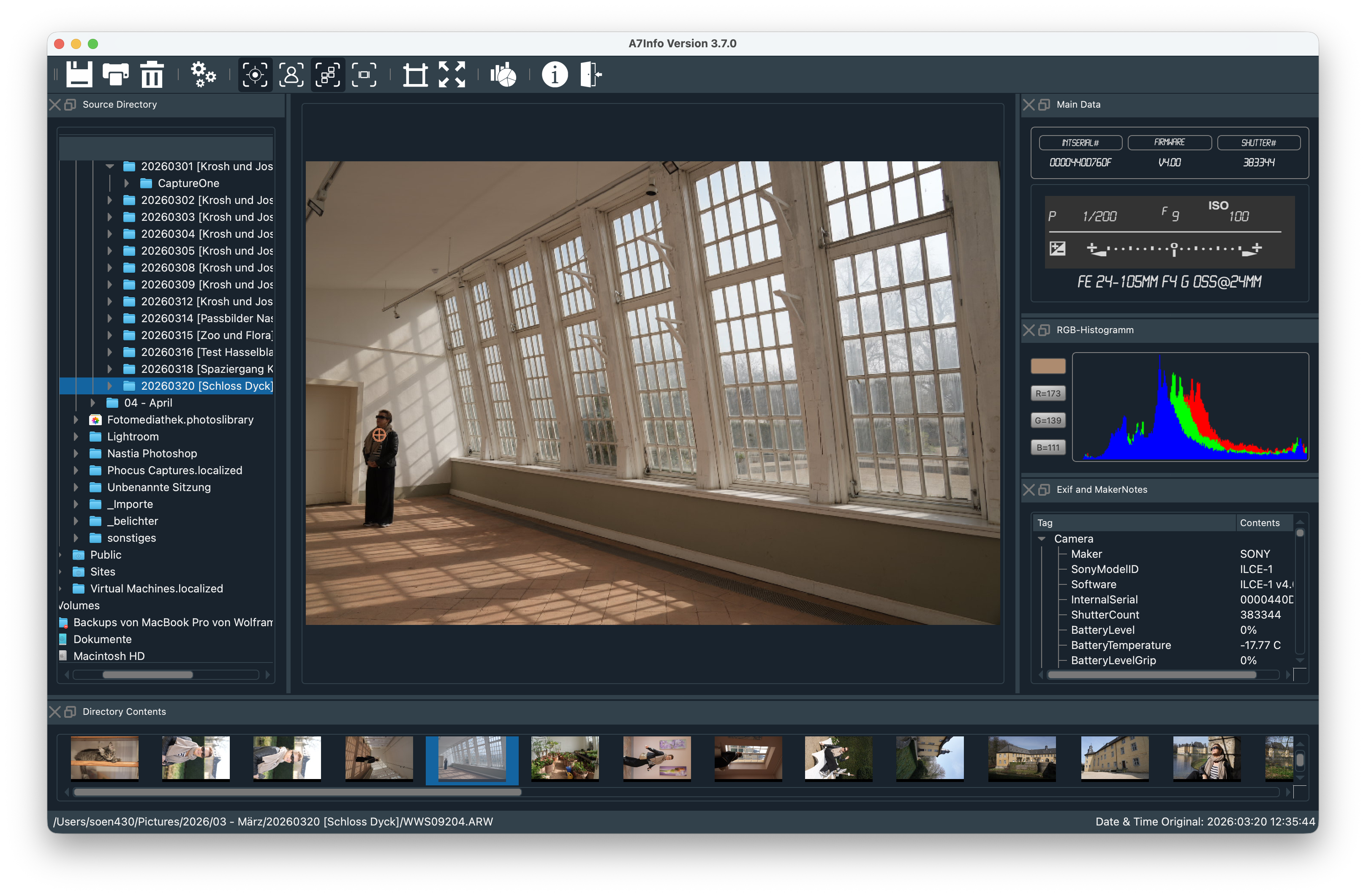
Das Hauptfenster besteht aus dem zentralen Vorschaubild und mehreren andockbaren Fenstern, die frei positioniert werden können. Die Anordnung wird gespeichert.The main window consists of the central preview image and several dockable windows that can be freely positioned. The arrangement is saved.
 1
2
3
4
5
6
7
8
1
2
3
4
5
6
7
8
Alle Programmfunktionen sind über Menü oder Toolbar erreichbar – beide sind deckungsgleich.All program functions are accessible via menu or toolbar — both are equivalent.
Zeigt das eingebettete JPG-Preview (max. 1616×1080) oder das Originalfoto. Doppelklick öffnet das Bild in voller Auflösung.Shows the embedded JPG preview (max. 1616×1080) or the original photo. Double-click opens the image at full resolution.
Laufwerks- und Verzeichnisbaum. Nach Auswahl eines Verzeichnisses werden die enthaltenen Bilder in der Thumbnail-Leiste angezeigt.Drive and directory tree. After selecting a directory, the images it contains are shown in the thumbnail bar.
Schnellübersicht über Blendenwerte des aktuellen Verzeichnisses. Klick wechselt zwischen ISO, Brennweite, Belichtungsprogramm und Messmethode.Quick overview of aperture values in the current directory. Click cycles through ISO, focal length, exposure program and metering method.
Alle Bilder des gewählten Verzeichnisses. Navigation mit Mausklick oder Pfeiltasten (Fokus muss im Thumbnail-Fenster liegen).All images in the selected directory. Navigate with mouse click or arrow keys (focus must be in the thumbnail window).
Zeigt Dateipfad, Dateiname und Aufnahmedatum des aktuell ausgewählten Bildes.Shows the file path, file name and capture date of the currently selected image.
Dashboard mit Belichtungsmodus (großer Buchstabe), Zeit/Blende/ISO/EV, Brennweite, Kamera-Streifen (Modell, Seriennummer, Firmware, Auslösezahl), Objektivname und Sternebewertung (0–5).Dashboard showing exposure mode (large letter), shutter/aperture/ISO/EV, focal length, camera strip (model, serial, firmware, shutter count), lens name, and star rating (0–5).
Alle Metadaten thematisch gruppiert: Camera, File, Picture, Light & Exposure, Lens, Autofocus & Drive, Miscellaneous, GPS. Ein Suchfeld oben filtert die Anzeige in Echtzeit; Escape setzt den Filter zurück.All metadata grouped by topic: Camera, File, Picture, Light & Exposure, Lens, Autofocus & Drive, Miscellaneous, GPS. A search field at the top filters the display in real time; Escape resets the filter.
WerkzeugleisteToolbar
Alle Toolbar-Funktionen sind identisch mit den entsprechenden Menüeinträgen. Die Toolbar kann vertikal gestellt oder vom Hauptfenster gelöst werden.All toolbar functions are identical to the corresponding menu entries. The toolbar can be oriented vertically or detached from the main window.
 1
2
3
4
5
6
7
8
9
10
11
12
13
1
2
3
4
5
6
7
8
9
10
11
12
13
File-Menü
SavePreview
Speichert das aktuell angezeigte Vorschaubild als JPG-Datei in der Größe 1616 × 1080 Pixel. Die JPG-Qualität (10–100 %) kann unter Settings → General → Preview Quality voreingestellt werden.Saves the currently displayed preview image as a JPG file at 1616 × 1080 pixels. The JPG quality (10–100 %) can be preset under Settings → General → Preview Quality.
Druckt einen Steckbrief des aktuellen Bildes: Thumbnail, Kamera- und Belichtungsdaten aus dem MainData-Fenster sowie EXIF- und MakerNotes. Der Druckumfang richtet sich nach den im Exif-Fenster aufgeklappten Gruppen (oder per Settings alle Daten).Prints a data sheet for the current image: thumbnail, camera and exposure data from the MainData window, and EXIF and MakerNotes. The scope of the printout is determined by the groups expanded in the EXIF window (or all data via Settings).
Delete
Verschiebt eine oder mehrere ausgewählte Dateien in den Papierkorb. Eine Bestätigungsabfrage kann in den Settings aktiviert werden.Moves one or more selected files to the trash. A confirmation prompt can be activated in Settings.
Export EXIF
Exportiert die Metadaten aller Bilder im aktuellen Verzeichnis in einer einzigen Datei. Wählbar sind das Format CSV (für Tabellenkalkulationsprogramme wie Excel oder Numbers) und JSON (für die Weiterverarbeitung mit eigenen Skripten). Alle EXIF- und MakerNotes-Felder, die A7Info ausliest, werden berücksichtigt.Exports the metadata of all images in the current directory into a single file. Choose between CSV (for spreadsheet applications such as Excel or Numbers) and JSON (for further processing with custom scripts). All EXIF and MakerNotes fields read by A7Info are included.
Export Ratings to XMP
Schreibt die in A7Info erfassten Sternebewertungen als XMP-Sidecar-Dateien in das aktuelle Verzeichnis. Die Dateien können anschließend in Lightroom importiert werden, um die Bewertungen in den Lightroom-Katalog zu übernehmen. Bereits vorhandene XMP-Dateien werden nicht überschrieben. Dieser Export ist als einmaliger Übertragungsschritt gedacht — für die laufende Arbeit empfiehlt sich die Bewertung direkt in Lightroom.Writes the star ratings captured in A7Info as XMP sidecar files to the current directory. The files can then be imported into Lightroom to transfer the ratings into the Lightroom catalogue. Existing XMP files are not overwritten. This export is intended as a one-time transfer step — for ongoing work, rating directly in Lightroom is recommended.
Settings / Preferences
Unter macOS ist der Punkt unter dem App-Menü als Preferences zu finden. Die Einstellungen werden beim Beenden gespeichert.On macOS, this item is found in the app menu as Preferences. Settings are saved on exit.
General
| EinstellungSetting | BeschreibungDescription |
|---|---|
| Updates – Check on start | Prüft beim Programmstart auf neue Versionen (Internet erforderlich)Checks for new versions on startup (internet required) |
| Show .arw only | Thumbnail-Anzeige auf ARW-Dateien beschränken; JPG-Daten werden weiterhin ausgelesenRestrict thumbnail display to ARW files; JPG data is still read |
| Confirm Delete | Zusätzliche Bestätigung beim Löschen von DateienAdditional confirmation when deleting files |
| Print – all data | Beim Drucken alle EXIF-/MakerNotes-Daten ausgeben (nicht nur die aufgeklappten Gruppen)Print all EXIF/MakerNotes data (not just the expanded groups) |
| Preview Quality | JPG-Qualität für SavePreview, 10–100 %JPG quality for SavePreview, 10–100 % |
Display
| EinstellungSetting | BeschreibungDescription |
|---|---|
| AF-Symbols | Farbe und Transparenz der Fokuspunkt-Anzeigen (FocusLocation, PhaseAF, TrackingAF)Color and transparency of focus point overlays (FocusLocation, PhaseAF, TrackingAF) |
| Raw InitialScale | Anfangsgröße der FullSizeRaw-Anzeige in % (z. B. 25–30 % für die A7R-Reihe)Initial scale of the FullSizeRaw display in % (e.g. 25–30 % for the A7R series) |
| OnScreenInfos Transparency | Transparenz des Kameradisplay-OverlaysTransparency of the camera display overlay |
Programs
Das aktuell angezeigte Bild kann mit einem externen Programm geöffnet werden. Über Add wird ein Programm hinzugefügt, über Remove wieder entfernt. Das Zielprogramm muss einen Dateinamen als Aufrufparameter akzeptieren.The currently displayed image can be opened with an external program. Use Add to add a program and Remove to remove it. The target program must accept a file name as a launch parameter.
View-Menü
Focus Location
Zeigt den von der Kamera zum Zeitpunkt der Aufnahme festgelegten Fokuspunkt als elegantes Symbol (zwei konzentrische Kreise mit vier Tick-Marken) im Vorschaubild an. Das Symbol pulsiert sanft, damit es auch vor kontrastarmen Bildstellen gut erkennbar ist. Farbe und Transparenz sind über Settings einstellbar.Displays the focus point set by the camera at the time of capture as an elegant symbol (two concentric circles with four tick marks) in the preview image. The symbol pulses softly so that it remains clearly visible even against low-contrast image areas. Colour and transparency can be adjusted in Settings.
FaceDetect Location
Zeigt die erkannten Gesichtsposition(en) als Rahmen im Vorschaubild an. Farbe und Transparenz sind über Settings einstellbar.Displays the detected face position(s) as a rectangle in the preview image. Color and transparency can be adjusted in Settings.
PhaseAF Locations
Sofern Phasen-AF aktiv war, werden die verwendeten AF-Felder eingeblendet. Farbe und Transparenz sind einstellbar.If phase AF was active, the AF fields used are displayed. Color and transparency can be adjusted.
TrackingAF Location
Bei aktiviertem Tracking wird bei Folgeaufnahmen anstelle der Phasen-AF-Felder das Tracking-Symbol oder das EyeAF-Symbol um den fokussierten Punkt dargestellt.With tracking active, subsequent shots show the tracking symbol or EyeAF symbol around the focused point instead of the phase AF fields.
OnScreen Infos
Blendet relevante Aufnahmeinformationen als Overlay über dem Vorschaubild ein — ähnlich dem Display oder Sucher der Kamera. Transparenz ist über Settings einstellbar.Displays relevant capture information as an overlay over the preview image — similar to the camera's display or viewfinder. Transparency can be adjusted in Settings.
FullSizeRaw
Öffnet das vollständige RAW-Bild in einem separaten Fenster. Die Decodierung erfolgt über die LibRaw-Bibliothek im Hintergrund-Thread — die Benutzeroberfläche bleibt während des Ladens vollständig bedienbar. Ein animierter Ladeindikator zeigt den Fortschritt an.Opens the full RAW image in a separate window. Decoding is done via the LibRaw library in a background thread — the user interface remains fully responsive during loading. An animated loading indicator shows progress.
Bilddarstellung: Das Bild wird mit linearem Gamma gerendert (kein Tone-Mapping, keine Kurven), mit aktivem Kamera-Weißabgleich. Dies zeigt die rohen Tonwertverhältnisse, wie sie der Sensor erfasst hat.Image display: The image is rendered with linear gamma (no tone mapping, no curves), with camera white balance applied. This shows the raw tonal relationships as captured by the sensor.
Zoom und Navigation: Das Bild füllt beim Öffnen automatisch den verfügbaren Bereich (Fit-to-View). Mausrad: Zoom in 5-%-Schritten zwischen 5 % und 400 %. Doppelklick: zurück zu Fit-to-View.Zoom and navigation: On opening, the image automatically fills the available area (Fit-to-View). Mouse wheel: zoom in 5 % steps between 5 % and 400 %. Double-click: return to Fit-to-View.
4-Kanal-RAW-Histogramm: Unterhalb des Bildes zeigt ein verschiebbarer Bereich (QSplitter) vier separate Histogramm-Panels direkt aus den Bayer-Rohdaten — R, G1, G2 und B. Die Horizontalachse verwendet eine EV-Skala von −12 bis +4 Blendenstufen (EV0 = ¹⁄₈ des Weißwerts); eine amber-farbene Linie markiert EV0. Die Sony-Schwarzwert-Korrektur (~512 ADU) wird automatisch abgezogen. G1 und G2 entsprechen den beiden Grünpositionen im Bayer-Muster — Abweichungen zwischen ihnen können auf Sensor-Banding hinweisen.4-channel RAW histogram: Below the image, a resizable area (QSplitter) shows four separate histogram panels directly from the Bayer raw data — R, G1, G2 and B. The horizontal axis uses an EV scale from −12 to +4 stops (EV0 = ¹⁄₈ of the white level); an amber line marks EV0. Sony black-level correction (~512 ADU) is applied automatically. G1 and G2 represent the two green positions in the Bayer pattern — deviations between them can indicate sensor banding.
RAW-Technologie-Panel: Eine kompakte Informationsleiste am unteren Rand zeigt technische RAW-Parameter direkt aus den Sony-MakerNotes: ARW-Formatversion, Kompression (unkomprimiert 14-Bit/12-Bit, Lossless, Lossless v.2, Lossy), aktive Bittiefe, RAW-Größe (L/M/S), Sensor- und aktive Dimensionen in Pixeln sowie Black-Level und White-Level in ADU-Werten.RAW technology panel: A compact information bar at the bottom shows technical RAW parameters directly from the Sony MakerNotes: ARW format version, compression (uncompressed 14-bit/12-bit, lossless, lossless v.2, lossy), active bit depth, RAW size (L/M/S), sensor and active dimensions in pixels, and black level and white level in ADU values.
Fenstergröße und Splitter-Position werden beim Schließen gespeichert und beim nächsten Öffnen wiederhergestellt.Window size and splitter position are saved when the window is closed and restored when it is next opened.
Statistics
Öffnet den Statistik-Dialog für erweiterte Auswertungen über ein ganzes Verzeichnis (inkl. Unterverzeichnisse).Opens the Statistics dialog for extended analyses across an entire directory (including subdirectories).
| BereichArea | BeschreibungDescription |
|---|---|
| ExifData | Auswahl eines EXIF-Feldes zur Diagrammdarstellung (Balken, Kreis, Donut)Select an EXIF field for chart display (bar, pie, donut) |
| Timeline | Aufnahmen als Liniendiagramm über Zeit: Tag / Monat / Jahr / mehrere JahreCaptures as a line chart over time: day / month / year / multiple years |
| Chart Style | BarChart (vertikal/horizontal), PieChart, Donut; Farbthemen: Dark, Light, Blue, u. a.BarChart (vertical/horizontal), PieChart, Donut; color themes: Dark, Light, Blue, and others |
| Files | Unterverzeichnisse und JPG-Dateien in die Auswertung einbeziehen (manuelles Aktualisieren erforderlich)Include subdirectories and JPG files in the analysis (manual refresh required) |
| Print / Clipboard | Diagramm drucken oder in die Zwischenablage kopierenPrint the chart or copy it to the clipboard |
Windows-Menü
Über das Windows-Menü können alle Fenster einzeln ein- oder ausgeblendet werden. Der Sichtbarkeitsstatus wird beim Beenden gespeichert.The Windows menu allows each window to be shown or hidden individually. The visibility state is saved on exit.
- Show Source Directory
- Show Statistics of Directory
- Show MainData
- Show Exif and MakerNotes
- Show Directory Contents (Thumbnails)
TastaturkürzelKeyboard Shortcuts
| TasteKey | FunktionFunction |
|---|---|
| J | Nächstes Bild im Thumbnail-BrowserNext image in thumbnail browser |
| K | Vorheriges Bild im Thumbnail-BrowserPrevious image in thumbnail browser |
| 0 – 5 | Sternebewertung setzen (0 = keine Bewertung)Set star rating (0 = no rating) |
| Escape | EXIF-Suchfeld zurücksetzenReset EXIF search field |
Help-Menü
Crop Resolution Calculator
Berechnet den Auflösungsverlust beim Beschneiden eines Bildes auf einen anderen Bildwinkel.Calculates the resolution loss when cropping an image to a different field of view.
Beispiel: Aus einem 61-MP-Bild (A7R IV, 50 mm) wird ein Ausschnitt gewählt, der einem 85-mm-Objektiv entspricht. Die effektive Auflösung sinkt auf ca. 21 MP.Example: From a 61 MP image (A7R IV, 50 mm), a crop is chosen that corresponds to an 85 mm lens. The effective resolution drops to approx. 21 MP.
About A7Info
Zeigt Programmversion und Kontaktinformationen an.Displays the program version and contact information.
4. Anhang4. Appendix
Erkannte ObjektiveRecognised Lenses
A7Info erkennt automatisch folgende Objektive und zeigt deren vollständigen Namen an. Die Liste wird mit neuen Versionen erweitert.A7Info automatically recognises the following lenses and displays their full name. The list is extended with new versions.
Vollständige Objektiv-Liste anzeigenShow complete lens list
| ObjektivLens | HerstellerManufacturer |
|---|---|
| Sony E 16mm F2.8 | Sony |
| Sony E 18-55mm F3.5-5.6 OSS | Sony |
| Sony E 18-135mm F3.5-5.6 OSS | Sony |
| Sony E 18-200mm F3.5-6.3 OSS | Sony |
| Sony E 18-200mm F3.5-6.3 OSS LE | Sony |
| Sony E 18-50mm F4-5.6 | Sony |
| Sony E 20mm F2.8 | Sony |
| Sony E 24mm F1.8 ZA | Sony |
| Sony E 30mm F3.5 Macro | Sony |
| Sony E 35mm F1.8 OSS | Sony |
| Sony E 50mm F1.8 OSS | Sony |
| Sony E 55-210mm F4.5-6.3 OSS | Sony |
| Sony E 70-350mm F4.5-6.3 G OSS | Sony |
| Sony E 10-18mm F4 OSS | Sony |
| Sony E 16-55mm F2.8 G | Sony |
| Sony E PZ 16-50mm F3.5-5.6 OSS | Sony |
| Sony E PZ 18-105mm F4 G OSS | Sony |
| Sony E PZ 18-110mm F4 G OSS | Sony |
| Sony E PZ 18-200mm F3.5-6.3 OSS | Sony |
| Sony FE 12-24mm F2.8 GM | Sony |
| Sony FE 12-24mm F4 G | Sony |
| Sony FE 16-35mm F2.8 GM | Sony |
| Sony FE 16-35mm F4 ZA OSS | Sony |
| Sony FE 20mm F1.8 G | Sony |
| Sony FE 21mm F2.8 (SEL28F20 + SEL075UWC) | Sony |
| Sony FE 16mm F3.5 Fisheye (SEL28F20 + SEL057FEC) | Sony |
| Sony FE 24mm F1.4 GM | Sony |
| Sony FE 24-70mm F2.8 GM | Sony |
| Sony FE 24-70mm F4 ZA OSS | Sony |
| Sony FE 24-105mm F4 G OSS | Sony |
| Sony FE 24-240mm F3.5-6.3 OSS | Sony |
| Sony FE 28mm F2 | Sony |
| Sony FE 28-60mm F4-5.6 | Sony |
| Sony FE 28-70mm F3.5-5.6 OSS | Sony |
| Sony FE 35mm F1.4 ZA | Sony |
| Sony FE 35mm F1.4 GM | Sony |
| Sony FE 35mm F1.8 | Sony |
| Sony FE 35mm F2.8 ZA | Sony |
| Sony FE 50mm F1.4 ZA | Sony |
| Sony FE 50mm F1.8 | Sony |
| Sony FE 50mm F2.8 Macro | Sony |
| Sony FE 55mm F1.8 ZA | Sony |
| Sony FE 70-200mm F2.8 GM OSS | Sony |
| Sony FE 70-200mm F2.8 GM OSS + 1.4X | Sony |
| Sony FE 70-200mm F2.8 GM OSS + 2X | Sony |
| Sony FE 70-200mm F4 G OSS | Sony |
| Sony FE 70-300mm F4.5-5.6 G OSS | Sony |
| Sony FE 85mm F1.4 GM | Sony |
| Sony FE 85mm F1.8 | Sony |
| Sony FE 90mm F2.8 Macro G OSS | Sony |
| Sony FE 100mm F2.8 STF GM OSS | Sony |
| Sony FE 100-400mm F4.5-5.6 GM OSS | Sony |
| Sony FE 100-400mm F4.5-5.6 GM OSS + 1.4X | Sony |
| Sony FE 100-400mm F4.5-5.6 GM OSS + 2X | Sony |
| Sony FE 135mm F1.8 GM | Sony |
| Sony FE 200-600mm F5.6-6.3 G OSS | Sony |
| Sony FE 200-600mm F5.6-6.3 G OSS + 1.4X | Sony |
| Sony FE 200-600mm F5.6-6.3 G OSS + 2X | Sony |
| Sony FE 400mm F2.8 GM OSS | Sony |
| Sony FE 400mm F2.8 GM OSS + 1.4X | Sony |
| Sony FE 400mm F2.8 GM OSS + 2X | Sony |
| Sony FE 600mm F4 GM OSS | Sony |
| Sony FE 600mm F4 GM OSS + 1.4X | Sony |
| Sony FE 600mm F4 GM OSS + 2X | Sony |
| Sony FE PZ 28-135mm F4 G OSS | Sony |
| Sony LA-EA1 / Sigma MC-11 Adapter | Sony / Sigma |
| Sony LA-EA2 Adapter | Sony |
| Sony LA-EA3 Adapter | Sony |
| Sony LA-EA4 Adapter | Sony |
| Sony LA-EA5 Adapter | Sony |
| Zeiss Batis 18mm F2.8 | Zeiss |
| Zeiss Batis 25mm F2 | Zeiss |
| Zeiss Batis 40mm F2 CF | Zeiss |
| Zeiss Batis 85mm F1.8 | Zeiss |
| Zeiss Batis 135mm F2.8 | Zeiss |
| Zeiss Loxia 21mm F2.8 | Zeiss |
| Zeiss Loxia 25mm F2.4 | Zeiss |
| Zeiss Loxia 35mm F2 | Zeiss |
| Zeiss Loxia 50mm F2 | Zeiss |
| Zeiss Loxia 85mm F2.4 | Zeiss |
| Zeiss Touit 12mm F2.8 | Zeiss |
| Zeiss Touit 32mm F1.8 | Zeiss |
| Zeiss Touit 50mm F2.8 Macro | Zeiss |
| Tamron 17-28mm F2.8 Di III RXD | Tamron |
| Tamron 17-70mm F2.8 Di III-A VC RXD | Tamron |
| Tamron 18-200mm F3.5-6.3 Di III VC | Tamron |
| Tamron 20mm F2.8 Di III OSD M1:2 | Tamron |
| Tamron 24mm F2.8 Di III OSD M1:2 | Tamron |
| Tamron 28-75mm F2.8 Di III RXD | Tamron |
| Tamron 28-200mm F2.8-5.6 Di III RXD | Tamron |
| Tamron 35mm F2.8 Di III OSD M1:2 | Tamron |
| Tamron 70-180mm F2.8 Di III VXD | Tamron |
| Tamron 70-300mm F4.5-6.3 Di III RXD | Tamron |
| Sigma 16mm F1.4 DC DN | C | Sigma |
| Sigma 19mm F2.8 [EX] DN | Sigma |
| Sigma 30mm F1.4 DC DN | C | Sigma |
| Sigma 30mm F2.8 [EX] DN | Sigma |
| Sigma 35mm F1.2 DG DN | A | Sigma |
| Sigma 35mm F1.4 DG HSM | A | Sigma |
| Sigma 35mm F2 DG DN | C | Sigma |
| Sigma 45mm F2.8 DG DN | C | Sigma |
| Sigma 56mm F1.4 DC DN | C | Sigma |
| Sigma 60mm F2.8 DN | Sigma |
| Sigma 65mm F2 DG DN | C | Sigma |
| Sigma 70mm F2.8 DG MACRO | A | Sigma |
| Sigma 85mm F1.4 DG DN | A | Sigma |
| Sigma 85mm F1.4 DG HSM | A | Sigma |
| Sigma 100-400mm F5-6.3 DG DN OS | C | Sigma |
| Sigma 100-400mm F5-6.3 DG OS HSM | C + MC-11 | Sigma |
| Sigma 105mm F1.4 DG HSM | A | Sigma |
| Sigma 105mm F2.8 DG DN MACRO | A | Sigma |
| Sigma 14-24mm F2.8 DG DN | A | Sigma |
| Sigma 150-600mm F5-6.3 DG OS HSM | C + MC-11 | Sigma |
| Sigma 150-600mm F5-6.3 DG OS HSM | S + MC-11 | Sigma |
| Sigma 24mm F1.4 DG HSM | A + MC-11 | Sigma |
| Sigma 24-35mm F2 DG HSM | A + MC-11 | Sigma |
| Sigma 24-70mm F2.8 DG DN | A | Sigma |
| Sigma 24-105mm F4 DG OS HSM | A + MC-11 | Sigma |
| Sigma 50mm F1.4 DG HSM | A | Sigma |
| Sigma 50-100mm F1.8 DC HSM | A + MC-11 | Sigma |
| Sigma 70-200mm F2.8 DG OS HSM | S + MC-11 | Sigma |
| Tokina FiRIN 20mm F2 FE AF | Tokina |
| Tokina FiRIN 20mm F2 FE MF | Tokina |
| Tokina FiRIN 100mm F2.8 FE MACRO | Tokina |
| Tokina atx-m 85mm F1.8 FE | Tokina |
| Voigtlander HELIAR-HYPER WIDE 10mm F5.6 | Voigtlander |
| Voigtlander SUPER WIDE-HELIAR 15mm F4.5 III | Voigtlander |
| Voigtlander ULTRA WIDE-HELIAR 12mm F5.6 III | Voigtlander |
| Voigtlander MACRO APO-LANTHAR 65mm F2 Aspherical | Voigtlander |
| Voigtlander MACRO APO-LANTHAR 110mm F2.5 | Voigtlander |
| Voigtlander APO-LANTHAR 50mm F2 Aspherical | Voigtlander |
| Voigtlander COLOR-SKOPAR 21mm F3.5 Aspherical | Voigtlander |
| Voigtlander NOKTON 21mm F1.4 Aspherical | Voigtlander |
| Voigtlander NOKTON 35mm F1.2 Aspherical SE | Voigtlander |
| Voigtlander NOKTON 40mm F1.2 Aspherical | Voigtlander |
| Voigtlander NOKTON 50mm F1.2 Aspherical | Voigtlander |
| Voigtlander NOKTON classic 35mm F1.4 | Voigtlander |
| Samyang AF 14mm F2.8 | Samyang |
| Samyang AF 18mm F2.8 | Samyang |
| Samyang AF 24mm F2.8 | Samyang |
| Samyang AF 35mm F1.4 | Samyang |
| Samyang AF 35mm F1.8 | Samyang |
| Samyang AF 35mm F2.8 | Samyang |
| Samyang AF 45mm F1.8 | Samyang |
| Samyang AF 50mm F1.4 | Samyang |
| Samyang AF 75mm F1.8 | Samyang |
| Samyang AF 85mm F1.4 | Samyang |
| Viltrox PFU RBMH 85mm F1.8 | Viltrox |
| Metabones Canon EF Smart Adapter | Metabones |
| Metabones Canon EF Smart Adapter Mark III | Metabones |
| Metabones Canon EF Smart Adapter Mark IV | Metabones |
| Metabones Canon EF Speed Booster | Metabones |
| Metabones Canon EF Speed Booster Ultra | Metabones |
VersionshistorieVersion History
- +Unterstützung Sony A7R VI (ILCE-7RM6) — alle MakerNote-Tags inkl. AF-Koordinaten und ARW 5.0 FormatkennungSupport for Sony A7R VI (ILCE-7RM6) — all MakerNote tags including AF coordinates and ARW 5.0 format identifier
- +FullSizeRaw: GPU-beschleunigter Bildbetrachter (Metal auf macOS, Direct3D 12 auf Windows) via Qt RHIFullSizeRaw: GPU-accelerated image viewer (Metal on macOS, Direct3D 12 on Windows) via Qt RHI
- +FullSizeRaw: Mipmaps und trilineare Filterung — flüssige Darstellung bei allen ZoomstufenFullSizeRaw: mipmaps and trilinear filtering — smooth rendering at all zoom levels
- +FullSizeRaw: Zoom 10 % pro Schritt, auf Mauszeiger zentriert; Tastatur: +/−, 0 = Fit-to-View, 1 = 100 %FullSizeRaw: 10 % zoom steps centred on mouse cursor; keyboard: +/−, 0 = Fit-to-View, 1 = 100 %
- *FullSizeRaw: Retina/HiDPI-korrektes Rendering (physische Pixelgröße statt logischer Koordinaten)FullSizeRaw: Retina/HiDPI-correct rendering (physical pixel size instead of logical coordinates)
- +FullSizeRaw: 4-Kanal-RAW-Histogramm (R/G1/G2/B) mit EV-Skala (−12 bis +4), Black-Level-Korrektur, Amber-EV0-LinieFullSizeRaw: 4-channel RAW histogram (R/G1/G2/B) with EV scale (−12 to +4), black-level correction, amber EV0 line
- +FullSizeRaw: lineares Vorschaubild (kein Gamma, kein Tone-Mapping) mit Kamera-WeißabgleichFullSizeRaw: linear preview (no gamma, no tone mapping) with camera white balance
- +FullSizeRaw: asynchrones Laden via QtConcurrent — UI bleibt während der Verarbeitung bedienbarFullSizeRaw: asynchronous loading via QtConcurrent — UI remains responsive during processing
- +FullSizeRaw: verschiebbarer Splitter zwischen Bild und HistogrammFullSizeRaw: resizable splitter between image and histogram
- +FullSizeRaw: Fit-to-View beim Öffnen, Mausrad-Zoom 5–400 %, Doppelklick-ResetFullSizeRaw: Fit-to-View on open, mouse-wheel zoom 5–400 %, double-click reset
- +FullSizeRaw: RAW-Technologie-Panel (ARW-Version, Kompression, Bittiefe, Sensordimensionen, Black/White-Level)FullSizeRaw: RAW technology panel (ARW version, compression, bit depth, sensor dimensions, black/white level)
- +Neues Bayer-Muster-Icon für den FullSizeRaw-Toolbar-ButtonNew Bayer pattern icon for the FullSizeRaw toolbar button
- *LibRaw 0.22.1 (Sicherheits-Fixes: Integer-Overflow im Float-DNG-Loader, Buffer-Overrun im YCC-Decoder)LibRaw 0.22.1 (security fixes: integer overflow in float DNG loader, buffer overrun in YCC decoder)
- *Neuer Installations-Workflow: macOS liefert A7Info.app direkt in einer DMG (Drag & Drop in Programme); Windows: Inno-Setup-InstallerNew installation workflow: macOS ships A7Info.app directly in a DMG (drag to Applications); Windows: Inno Setup installer
- +Neues dunkles Design mit Amber-Akzent; SVG-Icons in Toolbar und Metadaten-BaumNew dark design with amber accent; SVG icons in toolbar and metadata tree
- +MainData-Fenster neu aufgebaut (Dashboard-Layout mit Belichtungsmodus, Kamera-Streifen, Objektivname)MainData window redesigned (dashboard layout with exposure mode, camera strip, lens name)
- +J/K-Tastaturnavigation im DateibrowserJ/K keyboard navigation in the file browser
- +Echtzeit-Suchfeld im Exif-&-MakerNotes-FensterReal-time search field in the Exif & MakerNotes window
- +Sternebewertung 0–5 (Tastatur, Mausklick; gespeichert in
_a7info.json)Star rating 0–5 (keyboard, mouse click; stored in_a7info.json) - +Batch-EXIF-Export als CSV und JSONBatch EXIF export as CSV and JSON
- +Export Ratings to XMP für Lightroom-WorkflowExport Ratings to XMP for Lightroom workflow
- +FocusLocation: neues SVG-Symbol mit sanftem PulsingFocusLocation: new SVG symbol with soft pulsing
- *Bugfix: GPS-Zustand im TreeView wurde nicht korrekt gespeichertBugfix: GPS state in tree view was not saved correctly
- +Unterstützung Sony A7 Mark V (ILCE-7M5)Support for Sony A7 Mark V (ILCE-7M5)
- +Universal Binary für Apple Silicon und Intel (macOS)Universal Binary for Apple Silicon and Intel (macOS)
- +Build-System von qMake auf CMake umgestelltBuild system migrated from qMake to CMake
- *Bugfix: Modell-ID-Parsing lieferte bei allen Kameras falsche Werte für Seriennummer und AuslösezahlBugfix: model ID parsing returned wrong values for serial number and shutter count on all cameras
- +Anpassungen für Sony A1 Mark II (elektronischer Verschluss, ShutterCount)Adjustments for Sony A1 Mark II (electronic shutter, ShutterCount)
- +EXIF- und MakerNotes-Anzeige zeigt jetzt auch die Tag-BezeichnungenEXIF and MakerNotes display now also shows tag names
- *Bugfixes
- +Unterstützung Sony A1 Mark IISupport for Sony A1 Mark II
- +Unterstützung Sony A9 Mark IIISupport for Sony A9 Mark III
- *Bugfixes
- +Unterstützung A7CR und A7C IISupport for A7CR and A7C II
- +Unterstützung Sony A6700Support for Sony A6700
- +Unterstützung Sony A7R VSupport for Sony A7R V
- +Unterstützung Sony A7 IVSupport for Sony A7 IV
- +Face-Detection-Daten aus MakerNotesFace detection data from MakerNotes
Ältere Versionen anzeigenShow older versions
- *Aktualisierte Builds für macOS und Windows, BugfixesUpdated builds for macOS and Windows, bug fixes
- +Linux Support
- +Neues Setup-ProgrammNew setup program
- +DirectoryContents-Fenster verschiebbarDirectoryContents window movable
- +Unterstützung A1, A6100, A6400, A6600Support for A1, A6100, A6400, A6600
- +Chart-Druck im Statistik-DialogChart printing in Statistics dialog
- +Neuer Statistik-Dialog mit TimelineNew Statistics dialog with timeline
- +Erste Unterstützung A7C; Trennung PhaseAF / TrackingAFFirst support for A7C; separation of PhaseAF / TrackingAF
- +Erste Unterstützung A7S IIIFirst support for A7S III
Verwendete BibliothekenThird-party Libraries
A7Info verwendet die folgenden Open-Source-Bibliotheken von Drittanbietern:A7Info uses the following third-party open-source libraries:
| BibliothekLibrary | Version | LizenzLicence | Website |
|---|---|---|---|
| Qt | 6.x | LGPL v3 | www.qt.io |
| LibRaw | 0.22.1 | LGPL v2.1 / CDDL 1.0 | www.libraw.org |
Beide Bibliotheken sind unter ihren jeweiligen Open-Source-Lizenzen verfügbar. Der Quellcode kann auf den jeweiligen Projektwebseiten heruntergeladen werden.Both libraries are available under their respective open-source licences. The source code can be downloaded from the respective project websites.